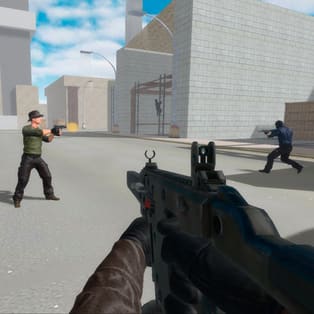
Combat Online 2
Combat Online 2 is a competitive multiplayer first-person shooter that focuses on quick reactions, clean aiming, and constant movement. Built for instant online matches, it drops you into intense firefights across different maps and game types, so you can switch between close-quarters chaos and longer-range duels whenever you want. Whether you queue solo or jump […]
- Developer
- NadGames
- Rating
- 4.4
- OS
- Web
- Category
- Shooter
















Play Combat Online 2 Online
Combat Online 2 is a competitive multiplayer first-person shooter that focuses on quick reactions, clean aiming, and constant movement. Built for instant online matches, it drops you into intense firefights across different maps and game types, so you can switch between close-quarters chaos and longer-range duels whenever you want. Whether you queue solo or jump in with friends, every match is designed to feel fast, direct, and action-packed.
How matches work
You enter an online lobby, pick a room or mode, and spawn into a live battlefield with other players. The core loop is simple: move smart, win gunfights, and keep pressure on key lanes and objectives. Because matches are quick and combat is constant, positioning and awareness matter as much as raw aim.
Controls
- Move: WASD or Arrow Keys
- Shoot: Left Click
- Aim / Camera: Mouse
- Jump: Space
- Change weapons: Number keys 1–9
- Sprint: Shift
- Menu / Scoreboard: Tab
What makes Combat Online 2 feel different
Combat Online 2 leans into classic FPS fundamentals: responsive controls, readable maps, and weapon switching that rewards players who adapt mid-fight. You can play aggressively in tight areas, hold angles for safer picks, or rotate with your team to control spawns and high-traffic routes.
Core mechanics you’ll use every match
- Fast weapon swapping: Use keys 1–9 to counter situations quickly, like switching to a close-range option when pushing corners.
- Sprint timing: Sprint helps you rotate and chase, but smart players slow down before peeking so they can shoot accurately and react instantly.
- Map awareness: Knowing common sightlines and flank paths often wins fights before they start.
- Multiplayer pacing: Expect frequent engagements—staying active and repositioning is usually better than hiding.
Tips to win more gunfights
- Pre-aim common angles: Keep your crosshair at head level while moving through doorways and corners.
- Use short bursts: If a weapon kicks, controlled bursts keep your shots on target and reduce missed bullets.
- Don’t sprint into danger: Sprint to move between areas, then stop before peeking to be ready to shoot.
- Rotate after a kill: After you win an exchange, change position to avoid being traded by another player who heard the fight.
- Switch weapons with purpose: If you’re losing close fights, swap to something better for tight spaces; if you’re holding long lanes, choose a weapon that stays accurate at range.
Platform notes
Combat Online 2 runs directly in your web browser and supports both desktop and mobile play. For the most consistent aiming and fast reactions, a desktop setup with mouse and keyboard is recommended, but touch controls can work well for casual matches on phones and tablets.
FAQ
Is Combat Online 2 free to play?
Yes. You can play Combat Online 2 for free in your browser.
Can I play Combat Online 2 on mobile and desktop?
Yes. It works on computers and on mobile devices like phones and tablets.
Can I play with friends online?
Yes. Combat Online 2 is a multiplayer FPS, so you can join online matches and play together.
Who created Combat Online 2?
Combat Online 2 was created by NadGames.
What are the main controls I should learn first?
Start with movement (WASD), aiming with the mouse, shooting with left click, sprinting with Shift, and quick weapon switching using the 1–9 keys.