Party Time
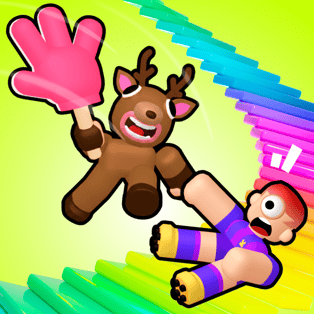
Party Time is a lively, colorful obstacle-course game where every run feels like a small celebration. You sprint across bright platforms, time your jumps, dodge tricky hazards, and use a clever size-change mechanic to slip through tight spaces or reach higher areas. With multiple courses to choose from and outfits to collect, it’s built for […]
- Developer
- PEEPS*
- Rating
- 4.2
- OS
- Web
- Category
- Adventure













Play Party Time Online
Party Time is a lively, colorful obstacle-course game where every run feels like a small celebration. You sprint across bright platforms, time your jumps, dodge tricky hazards, and use a clever size-change mechanic to slip through tight spaces or reach higher areas. With multiple courses to choose from and outfits to collect, it’s built for quick sessions that still feel rewarding.
How the runs work
Each course is a compact obstacle route designed around movement control and timing. Your goal is simple: reach the finish without falling off, getting pushed away, or mistiming a jump. The challenge comes from learning each section’s rhythm—some parts reward patience and small hops, while others are about keeping momentum.
Controls
- Move: WASD or Arrow Keys
- Jump: Space
- Look around: Move your mouse
- Select a course: Use your mouse to click and choose
Core mechanics and features
Party Time focuses on classic obby fundamentals—clean jumps, controlled landings, and hazard awareness—then spices them up with playful customization and size-based movement options.
- Colorful obstacle courses: Bright environments make hazards easy to read, but the layouts still demand accuracy.
- Size changing: Adjusting your character’s size affects how you move through the map, helping with narrow gaps, visibility, and certain jumps.
- Outfits and style: Pick up fun outfits while you play to personalize your character and keep runs feeling fresh.
- Quick restarts, fast learning: Failures are part of the loop—retries help you memorize patterns and improve your timing.
Tips to finish more courses
- Use your camera before you jump: Rotate the view to confirm where you’ll land. Many falls happen because the landing platform is slightly offset.
- Make “test jumps” on new sections: A small hop can reveal moving parts, slippery edges, or timing windows without risking a full commit.
- Control momentum: Not every jump needs a sprint. For narrow platforms, walk up, stop, then jump to reduce overshooting.
- Change size with intent: If a section feels inconsistent, try adjusting size to improve clearance or alignment for your next landing.
- Learn one checkpoint at a time: Focus on mastering the next segment rather than rushing the entire course.
Platform and accessibility
Party Time runs directly in your web browser and is designed to work on both desktop and mobile devices. On desktop, the keyboard and mouse make movement and camera control precise. On mobile, touch controls can still handle quick runs, especially once you know the course layout.
FAQ
Is Party Time free to play?
Yes. You can play Party Time for free in your web browser.
Who made Party Time?
Party Time was created by PEEPS*.
Can I play Party Time on phones and tablets?
Yes. Party Time works on mobile devices as well as desktop computers.
What kind of game is Party Time?
It’s an obby-style platformer where you jump, run, dodge obstacles, and use size changes to reach the goal.
How do I switch between courses?
Use your mouse to click and select between the different available courses.