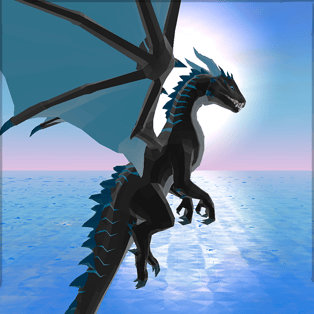
Dragon Simulator 3D
Dragon Simulator 3D puts you in control of a powerful dragon in a large 3D world filled with missions, flying challenges, and targets to hunt. Instead of playing as a hero who fights dragons, you become the creature itself—gliding over mountain ridges, diving through valleys, and using fire and brute force to complete objectives. As […]
- Developer
- CyberGoldFinch
- Rating
- 4.4
- OS
- Web (Desktop)
- Category
- Simulation













Play Dragon Simulator 3D Online
Dragon Simulator 3D puts you in control of a powerful dragon in a large 3D world filled with missions, flying challenges, and targets to hunt. Instead of playing as a hero who fights dragons, you become the creature itself—gliding over mountain ridges, diving through valleys, and using fire and brute force to complete objectives. As you finish tasks and collect stars, your dragon levels up, becoming faster, stronger, and more dangerous.
The core loop is simple and satisfying: explore the map, accept missions, earn stars, and upgrade your dragon to unlock better performance. The open environment encourages roaming, but the mission system gives you clear goals so every flight has a purpose.
How to play and control your dragon
Dragon Simulator 3D uses keyboard and mouse controls and rewards players who learn smooth takeoffs, precise turns, and good timing during attacks. Flying feels best when you combine altitude control with speed boosts and planned dives.
- Move: WASD
- Spit fire: Left Mouse Button (LMB)
- Tail attack: Right Mouse Button (RMB)
- Take-off / Land: Q
- Fly up: Spacebar
- Fly down: C
- Speed up: Shift
- Lock cursor: L
- Hide interface: H
If the camera or aiming feels awkward, locking the cursor can help you keep control during fast turns, especially when you are chasing moving targets.
Progression, missions, and upgrades
Your main source of progression is stars. Missions scattered across the level reward you with stars, and once you collect enough, your dragon upgrades to the next level. Each upgrade makes your dragon noticeably more capable, so early grinding quickly turns into confident hunting and high-speed travel.
Expect a mix of tasks that test different skills:
- Combat missions that require efficient fire breathing and close-range tail attacks.
- Travel and exploration objectives that push you to use the terrain, climb altitude, and manage landing safely.
- Skill-building challenges that improve flight control and targeting over time.
Key mechanics that make the simulation feel good
Dragon Simulator 3D stands out as an animal-style simulator because it blends free-flight with mission-based direction. The world design supports long, scenic glides, while combat provides quick bursts of action when you engage enemies or complete hunting goals.
| Mechanic | What it changes |
| Flight control | Altitude, speed, and turning determine how easily you can chase targets and escape danger. |
| Fire breath | Your main ranged option, ideal for starting fights or dealing damage without taking hits. |
| Tail attack | Close-range burst damage when you are directly on top of an opponent. |
| Star-based leveling | Clear long-term progression that makes missions feel meaningful. |
| UI tools | Cursor lock and interface toggle help with visibility and control. |
Tips to earn stars faster
- Use height before fighting: Climb above the area, then dive toward the target. You will approach faster and maintain better control.
- Open with fire, finish with tail: Fire breath helps soften targets from range, while the tail attack is great when you are already close.
- Don’t waste momentum: After takeoff, keep moving and plan turns wide. Tight turns can slow you down and make aiming harder.
- Land only when needed: Landing can reset your approach and help with orientation, but staying airborne keeps you flexible and safer.
- Prioritize nearby missions: Completing clustered objectives quickly is often faster than crossing the entire map between tasks.
Platform and technical notes
This game runs directly in your web browser and is designed around keyboard-and-mouse play. For the smoothest experience, close heavy background tabs and play in a modern browser with hardware acceleration enabled.
FAQ
How do you level up in Dragon Simulator 3D?
You level up by completing missions and collecting stars. When you reach the required number of stars, your dragon upgrades and becomes stronger and faster.
What is the best way to control flying?
Use altitude control (fly up and down) together with wide turns. Gaining height before moving toward objectives makes dives and attacks easier to manage.
What’s the difference between fire and tail attack?
Fire breath is a ranged attack for starting fights safely, while the tail attack is a close-range option that works best when you are right next to the target.
Who made Dragon Simulator 3D?
Dragon Simulator 3D was created by CyberGoldFinch, known for other animal simulation games such as Tiger Simulator 3D, Horse Simulator 3D, and Dog Simulator 3D.
Can I play Dragon Simulator 3D on mobile?
The game is primarily built for keyboard and mouse in a browser. It may run on some mobile browsers, but controls and camera handling are best on desktop.