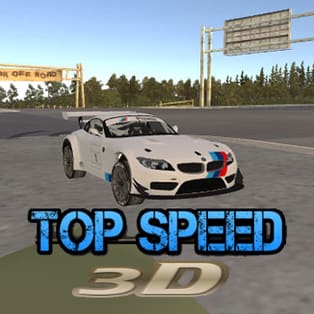
Top Speed 3D
Top Speed 3D is a 3D driving game built around one simple idea: give you a powerful sports car, a wide-open city map, and the freedom to chase high speeds without pressure. Instead of forcing you into constant races, it lets you learn the handling, tune your setup, and enjoy clean runs across empty streets. […]
- Developer
- Faramel Games
- Rating
- 4.5
- OS
- Web
- Category
- Racing









Play Top Speed 3D Online
Top Speed 3D is a 3D driving game built around one simple idea: give you a powerful sports car, a wide-open city map, and the freedom to chase high speeds without pressure. Instead of forcing you into constant races, it lets you learn the handling, tune your setup, and enjoy clean runs across empty streets. If you want a relaxed place to drift, test upgrades, and explore car performance, this is the kind of browser racing game that fits perfectly.
The best part is how quickly it turns experimentation into progress. You can adjust how your car feels, repair damage after crashes, and keep improving your ride over time. There is also a helpful driving assistant for players who want a smoother start before going fully manual.
How driving works
You start with a sports car and an open city environment designed for practice and speed runs. The goal is self-driven: build confidence with cornering, learn where your car loses traction, and push for higher top speeds as you upgrade.
- Explore the city: Use long straight roads to test acceleration and top speed, then head into turns to practice braking points and drifting control.
- Crash and recover: Mistakes are part of the loop. When you hit something, you can return to the auto shop for repairs and improvements instead of restarting a strict event.
- Use the driving assistant: If you are new to 3D driving games, the assistant helps you settle into steering and speed management before you push harder.
- Save your progress: Your stats can be saved so you can return later and continue upgrading and refining your build.
Customization and tuning that changes the feel
Top Speed 3D focuses on upgrades that affect the way the car behaves, not just cosmetics. You can make a car that feels planted and stable, or one that is loose and drift-friendly depending on your choices.
Cosmetic changes
- Color: Personalize your car’s look for a clean showroom style or a bold street build.
- Wheels: Change the visual stance and style of the car to match your preferred vibe.
Performance upgrades
- Suspension: Impacts how the car handles bumps and how stable it feels in corners.
- Handling: Affects steering response and control at speed, especially through turns.
- Horsepower: Improves acceleration and helps you reach higher top speeds on long straights.
Because repairs and upgrades are accessible, the game encourages you to test a setup, drive it hard, then tune again until the car matches your driving style.
What makes Top Speed 3D stand out
- Open city map: Empty streets give you room to practice speed, drifting, and turning lines without constant interruptions.
- Low-pressure progression: Instead of demanding perfect race performance, the game rewards exploration, tuning, and time spent learning the car.
- Quick repair loop: Crashes are not a punishment. They are a signal to repair and adjust your build.
- Accessible onboarding: A driving assistant option helps beginners get comfortable before attempting higher speeds.
- Browser-friendly play sessions: Save your stats, leave, and return when you want to keep improving.
Tips to reach higher speeds and cleaner drifts
- Upgrade with a purpose: If you spin out a lot, focus on handling and suspension before stacking horsepower.
- Use straight roads for testing: When you increase horsepower, measure the difference on the same long stretch so you can feel the change.
- Brake early, then roll in: For smoother corners, reduce speed before the turn and accelerate gradually as you exit.
- Practice drifting in open areas: Start with gentle slides at moderate speed. Big drifts become easier once you can control small ones.
- Turn off assistance when ready: Use the assistant to learn, then switch to full control to improve precision and reaction timing.
Platform and technical notes
| Platform | Web browser |
| Controls | Works best with standard browser controls; performance depends on device and browser |
| Progress | Stats can be saved so you can continue later |
| Session style | Short practice runs or longer tuning and driving sessions |
FAQ
Is Top Speed 3D a racing game or an open driving game?
It is a racing-focused driving game, but the core experience is open-map driving where you test speed, handling, and upgrades rather than following strict race events.
What happens if I crash?
You can go to the auto shop for repairs and continue playing. Crashes are part of the learn-and-upgrade loop.
Do upgrades actually change gameplay?
Yes. Adjusting suspension, handling, and horsepower changes how the car accelerates, corners, and stays stable at high speeds.
Can I save progress and come back later?
Yes, the game lets you save your stats so you can return and continue building your car.
Is there an option for beginners?
Yes. You can use a driving assistant to help you get comfortable before pushing higher speeds or attempting more controlled drifts.