Anycolor by Numbers
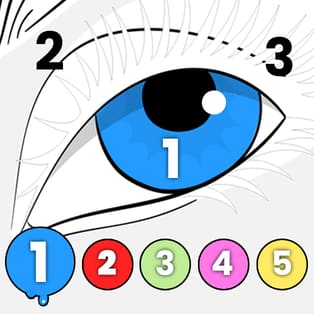
Anycolor by Numbers is a relaxing color-by-number browser game where every drawing is finished by matching the correct color to the correct number. Instead of free painting, you solve each picture like a gentle puzzle: pick a number, find its marked areas, and tap to fill them in until the artwork is complete. With a […]
- Developer
- Aniway
- Rating
- 4.2
- OS
- Web
- Category
- Puzzle















Play Anycolor by Numbers Online
Anycolor by Numbers is a relaxing color-by-number browser game where every drawing is finished by matching the correct color to the correct number. Instead of free painting, you solve each picture like a gentle puzzle: pick a number, find its marked areas, and tap to fill them in until the artwork is complete. With a gallery full of clean, cozy designs and an option to download your finished image, it’s an easy pick for anyone who wants calm, satisfying progress.
Color-by-number gameplay that feels like a puzzle
Each picture is divided into small regions, and every region has a number. That number corresponds to a color from the numbered palette on the side. When you select a number, all matching regions are highlighted, making it simple to see what to color next.
How to play
- Open the gallery and choose an image (scroll for more designs).
- After the image loads, select a Number icon from the side palette.
- All regions with that number will highlight (often with a grey/white checkered look).
- Tap or click highlighted regions to fill them with the correct color.
- When all regions for a number are filled, that Number icon disappears.
- Repeat for the remaining numbers until the picture is fully colored.
- Use the download/save button to keep your finished artwork, then return to the gallery for the next image.
What makes Anycolor by Numbers satisfying
- Guided coloring: Highlights remove guesswork and keep the experience smooth.
- Clear completion feedback: Number icons vanish when finished, so you always know your progress.
- Gallery variety: Multiple drawings to complete, with more available by scrolling.
- Downloadable results: Save your completed picture to share or keep as a personal collection.
- Calm pace: No timers, no pressure—just steady, relaxing completion.
Tips to finish pictures faster (without missing spots)
- Complete one number at a time: Since the game highlights matching regions, finishing a number fully prevents backtracking.
- Use the disappearing icon as a checklist: If the number icon is still visible, there are hidden regions left—scan the image edges and tight corners.
- Zoom in when needed: Small regions can hide in detailed areas; zooming helps avoid leaving uncolored fragments.
- Alternate between large and small numbers: If a number has many tiny regions, take a break by completing a larger, easier set next.
- Save your favorites: Download completed images you like so you can compare your finished set over time.
Platform and controls
| Platform | Web browser |
| Controls | Mouse click or touch tap to select numbers and fill highlighted regions |
| Ideal for | Quick relaxing sessions on desktop, phone, or tablet |
Because the controls are simple tapping/clicking, the game plays comfortably on both desktop and mobile browsers.
FAQ
Is Anycolor by Numbers free to play?
Yes. You can play it for free in your web browser.
Can I play Anycolor by Numbers on mobile and desktop?
Yes. It works on both computers and mobile devices like phones and tablets.
How do I know when a number is fully completed?
When all areas for a selected number are filled, that Number icon disappears from the palette.
Can I save my finished drawings?
Yes. Use the download/save button to save the completed image.
Who made Anycolor by Numbers?
Anycolor by Numbers was created by Aniway, a game development team based in Finland.