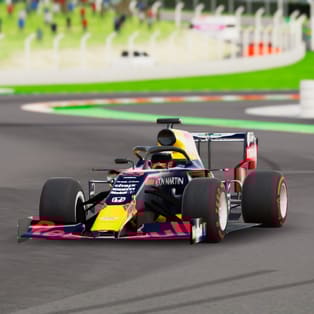
Super Star Car
Super Star Car is a fast-paced 3D racing game where you build your Formula-style career one race at a time. With sharp circuits, responsive handling, and multiple camera angles, it captures the feeling of pushing a single-seater car to the limit. Win races, earn money, and invest in upgrades that make your car quicker, more […]
- Developer
- Barnzmu
- Rating
- 4.5
- OS
- Web (Desktop)
- Category
- Racing













Play Super Star Car Online
Super Star Car is a fast-paced 3D racing game where you build your Formula-style career one race at a time. With sharp circuits, responsive handling, and multiple camera angles, it captures the feeling of pushing a single-seater car to the limit. Win races, earn money, and invest in upgrades that make your car quicker, more stable, and better suited for the next challenge.
The more you play, the more the game becomes about smart driving: carrying speed through corners, braking at the right moment, and choosing upgrades that fit your style. If you like competitive lap times and clean racing lines, this is the kind of browser racer that keeps you chasing the next perfect run.
How to Play and Controls
The goal is simple: race hard, finish strong, and keep improving your performance to climb toward the championship.
- Drive: WASD or Arrow keys
- Respawn: Space bar
- Change camera: C
Use the camera switch to find the view that helps you judge braking distances and corner exits best. A closer angle can help with precision, while a wider view makes it easier to anticipate turns and track edges.
Racing Feel, Progression, and Upgrades
Super Star Car focuses on clean control and speed management. Each circuit rewards consistency: the difference between winning and falling behind often comes from how smoothly you link corners together.
Earn money and tune your car
After races, you’ll earn money that can be spent on improvements. Upgrades matter because they directly impact how the car behaves at top speed and under braking. Depending on what the game offers in your run, aim to balance:
- Acceleration and top speed for faster straights and better launches
- Handling and stability to hold tighter lines through technical sections
- Control consistency so the car stays predictable when pushing hard
Camera options for realism and control
Switching camera views isn’t just cosmetic. It changes how you perceive speed and distance. If you’re clipping corners or braking too late, try another view and notice how your timing improves.
Tips to Win More Races
- Brake earlier than you think, then accelerate sooner. A clean corner exit usually gains more time than diving into a turn too fast.
- Stay smooth on steering inputs. Small, controlled adjustments help maintain traction and prevent wide exits.
- Use respawn strategically. If you lose too much time after a mistake, tapping respawn can get you back into a better racing line faster.
- Learn one track at a time. Focus on memorizing the toughest corners first, then optimize the rest of the lap.
- Upgrade with a purpose. If you’re constantly sliding or missing apexes, prioritize handling before chasing raw speed.
Platform and Performance
Super Star Car runs directly in your web browser. For the best experience, close heavy background tabs and use a stable connection. A keyboard is recommended for precise control, especially in higher-speed sections and sharp corner combinations.
FAQ
Is Super Star Car free to play?
Yes. You can play it in your browser without downloading anything.
How do I change the camera in Super Star Car?
Press C to cycle through the available camera views.
What should I upgrade first?
If you’re struggling to keep the car stable in corners, start with handling-focused upgrades. If you already feel consistent, invest in speed and acceleration to improve lap times.
What are the controls for driving?
Use WASD or the Arrow keys to drive. Press Space to respawn if you crash or get stuck.